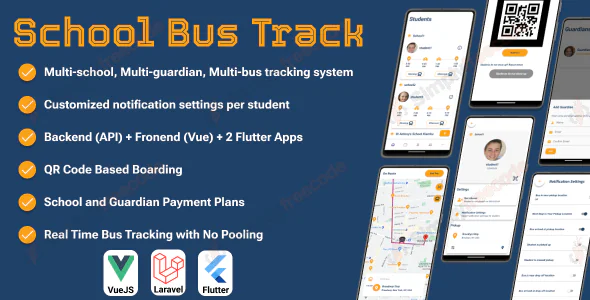
SchoolBusTrack is a smart and user-friendly system designed to help parents monitor their children’s daily school transportation with ease. It allows real-time school bus tracking, instant alerts when the bus is approaching, and notifications when a child boards or exits the bus, giving parents peace of mind throughout the journey.
SchoolBusTrack includes:
- Two Flutter mobile apps for parents (guardians) and drivers
- A powerful admin panel built with a Laravel API backend and a Vue.js web interface
Key features and benefits:
- Built with Flutter, enabling a single codebase for both Android and iOS apps on Google Play and the App Store
- Parents can track multiple buses at the same time, even if their children attend different schools
- Support for multiple guardian sub-accounts, allowing shared access with limited permissions
- Parents and drivers can register directly through the apps, with driver accounts requiring admin approval
- Parents can add multiple children from the app, with student approval managed by the admin
- Each student can be assigned to separate morning and afternoon routes, even across different schools
- Nearby pickup and drop-off stops can be selected by parents based on routes created by the school admin
- Per-student notification settings, including alerts for bus proximity, arrival, pickup, and drop-off events
- QR code-based student check-in system used by drivers, generated directly from the parent app
- Flexible subscription plans for schools or parents, including one-time or trial plans
SchoolBusTrack offers a complete multi-school bus tracking solution with real-time visibility, secure access, and flexible management for parents, schools, and drivers.
Demo (Simple mode)
- Backend, go to the demo website and log in using
- Guardian Mobile App, click here
- Driver Mobile App, click here
Demo (Advanced mode)
- Backend, go to the demo website and log in using
- Super Admin credentials
- Demo school credentials
- Guardian Mobile App, click here
- Driver Mobile App, click here
Please note that delete and some update functions are disabled in the demo
How to test the system (Simple mode)
- Create a new school and set its address (the system will notify you to do so).
- Open the driver app and register for a new driver.
- Go to the Guardian app, register your account, and add one or more students.
- Go to the school admin panel and do the following:
- Approve the driver.
- Add a new bus.
- Assign the bus to the driver.
- Approve the student.
- Assign each student a morning and afternoon bus (the system will notify you to do so).
- Set each student’s pickup and drop-off locations from the guardian app.
- Go to the driver app and start the trip.
- Track the trip from the Guardian app.
How to test the system (Advanced mode)
- Open the driver app and register for a new driver.
- Go to the school admin panel and do the following:
- Approve the driver’s documents.
- Add a new bus.
- Assign the bus to the driver.
- Create a new route.
- Create a trip on that route.
- Assign the trip to the new driver.
- Go to the driver app and start the trip.
- Go to the guardian app and try to set the pickup and drop-off stops of a student in the same geographical area where the created route is located. Make sure that there is enough coins in either school or your account.
- Track the trip from the guardian app.
- Navigate the route as the driver. When your location is close to the student, an alert will appear in the driver app to slow down. When the driver reaches the student’s location, a pop-up will appear to allow the driver to scan the student’s ID to check him in.
- When the driver reaches the student’s drop-off point, a pop-up will appear to allow the driver to check him out.
Requirements
Please make sure that you have accounts for
- VPS server with root credentials
- Google Maps API with the following APIs enabled
- Geocoding API
- Maps JavaScript API
- Places API
- Directions API
- Routes API
- Maps SDK for Android
- Maps SDK for iOS
- Firebase account
- One payment gateway from the following:
- Braintree SDK. You can test with a sandbox account OR integrate a live account.
- Stripe
- RazorPay
- Flutterwave
- Paystack